Why a photo on an ID pass doesn't stop a fake, and what does
Staff IDs, crew passes and member cards all trust the same thing: a printed photo and a name. Here is how we built Verified Photo Pass, where the QR code is the holder's face and every scan asks our server whether the pass is real.
Look at almost any staff ID or event pass on a lanyard and you'll find the same three things: a logo, a name and a photo. They feel official, and they're trivially easy to copy. Anyone with the event's logo, a printer and a laminator can make one with their own face on it, and a guard at a busy gate has a couple of seconds to decide.
Adding a plain QR code doesn't help much either. If it just holds a name or a member number, a copy of the code is as good as the original, and a made-up one looks exactly the same to the guard.
When we built Verified Photo Pass, we started from the question a guard actually needs answered: is this pass real, is it still valid, and is it this person's? Everything below follows from that.
Problem 1: a printed pass can't prove it's real
A printed pass can only show what's on it. Nothing on the card can tell you whether the organisation that's named on it actually issued it, or whether it was revoked last week when the person left.
The fix: the check happens on our server, not on the card
- Every pass opens a check page on qrcodespot.com with a random code only our server knows. A made-up pass shows “Not a real pass”.
- The check page says whether the pass is valid, expired or revoked, and who issued it. Revoke a pass and it says so straight away, on printed cards and phones alike.
- It shows the photo on file, not the one on the card. A real pass with someone else's face glued on doesn't match.
- Anyone can make an account with any name and logo, and the check page says so. A pass from an account on a paid plan shows “✓ Verified issuer”. Any other pass carries a clear warning to accept it only if you know who issued it.
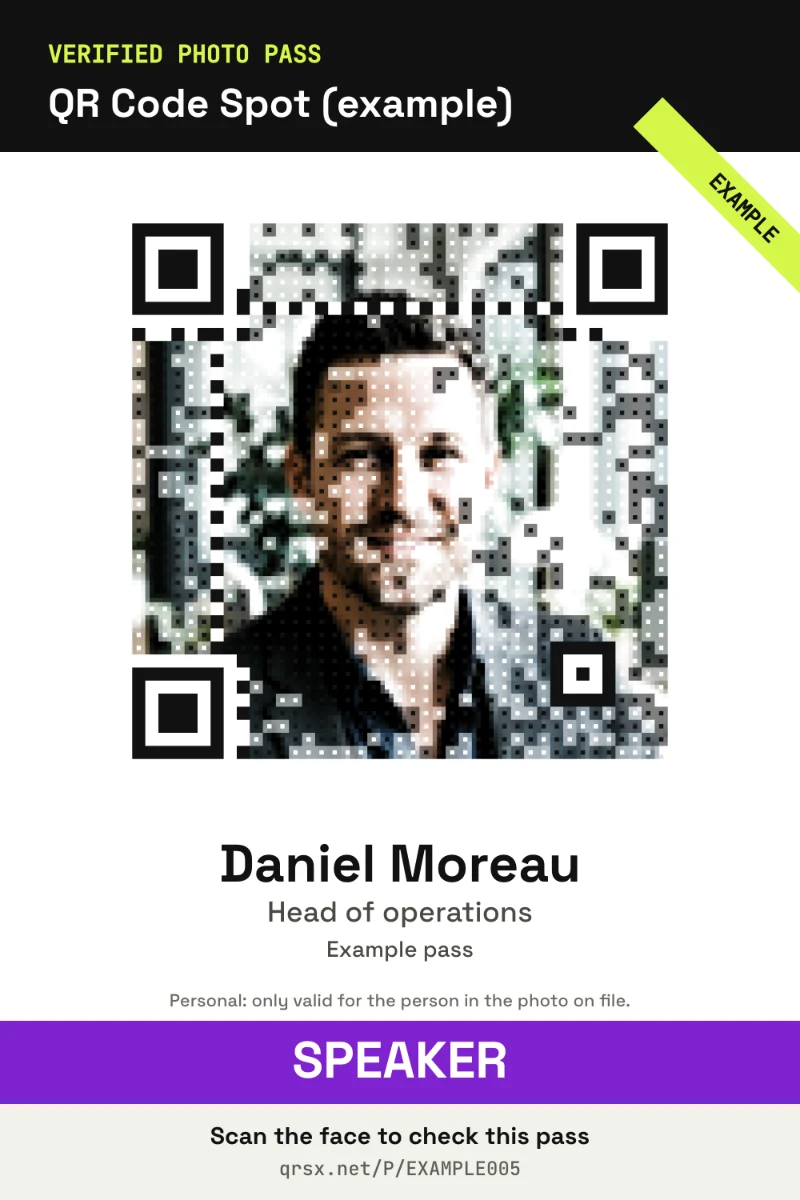
And the code itself is the holder's face, built with the same engine as Photo QR. The guard sees a person, not a barcode, and the person and the code can't be separated without it showing.
Problem 2: a copycat organiser
A careful forger doesn't print a fake card. They open their own account, give it your event's name, upload your logo and issue passes of their own. Those passes are real, so the check page has nothing to object to. They just aren't yours.
The fix: your gates only trust your passes, and your name is held on your dates
- Your gate scanners only accept passes and tickets issued by your own account. Anything else goes red with “Not from your organisation”, whatever name, logo or tick it carries, and you get an email.
- On a paid plan, from 3 days before your event until 3 days after it, no other account can run an event with a name like yours, or like your organisation's. “Like” covers the usual tricks: capitals and spacing, accents, a 0 for an O, letters from other alphabets that look Latin, one-letter slips, and extras such as “The”, “Ltd” or “Crew 2027” around your name. Generic event names such as “Staff” or “VIP passes” don't count, so nobody is blocked by them.
The same organisation name can still exist twice: a Harbour Festival in another country on other dates is welcome. What's refused is a lookalike on your dates.
Problem 3: screenshots and forwarded pictures
Phone passes have their own weakness. If the code never changes, the holder can screenshot it and send it to a friend, and now two people get in on one pass.
The fix: a live pass that changes every minute
Each holder can get a live pass: a link that shows their pass on their phone with a code that changes every minute. A screenshot, a printout or a forwarded picture stops working within 2 minutes. For key roles, such as organisers, artists or crew with backstage access, tick Phone only and printed cards are refused altogether.
Problem 4: printed cards still get photocopied
Some people need a card on a lanyard, and a printed card can always be copied. We can't stop the photocopier, so we made a copy easy to catch:
- Each printed card carries its own card number, and the gate shows which one was scanned. A code without its card number is refused.
- If a card is lost, replace it: the old card is refused at once, and the holder's live pass carries on.
- Gates keep track of who's inside. A pass shown again while its holder is already in is flagged “Already inside”, and you get an email.
- Ten wrong card codes in an hour pause that printed card for an hour, so nobody can guess their way to a working copy.
Problem 5: one gate, many kinds of people
At a real event, a stage manager, a caterer and a journalist don't go to the same places. A pass that just says “Crew” leaves the guard to remember who may go where.
The fix: pass types, zones and a gate scanner
- Pass types (Organiser, Crew, Artist, VIP, Press) set a colour, the zones each type may enter, and how many entries it gets: unlimited, a number in total, or a number a day.
- Zones are the areas inside, like Backstage or the Media pit, each with its own gates.
- The gate scanner runs on any guard's phone. You make a gate link, and the guard types the gate's 6-digit PIN once to pair their phone; 5 wrong PINs lock it for 15 minutes and email you. It accepts only real passes from your own account, shows the photo on file and marks people in and out.
- Someone at the wrong gate? The scanner says so and tells the guard which gate to send them to.
Problem 6: collecting 300 photos
The dull part of any ID pass system is getting a decent photo of everyone. Instead of chasing people for pictures, you can invite them: upload your crew list as a spreadsheet, and each person gets their own link. Their camera opens with an oval to fit their face in and live tips (closer, more light, only you), and takes the photo when it's right. You review each selfie with a preview of the code, approve it or ask for another, and the same link becomes their live pass.
If you do have photos, any photo works. The face is found in your browser and framed square with room for the head and shoulders, and you can drag and zoom before you confirm.
Full colour or halftone print
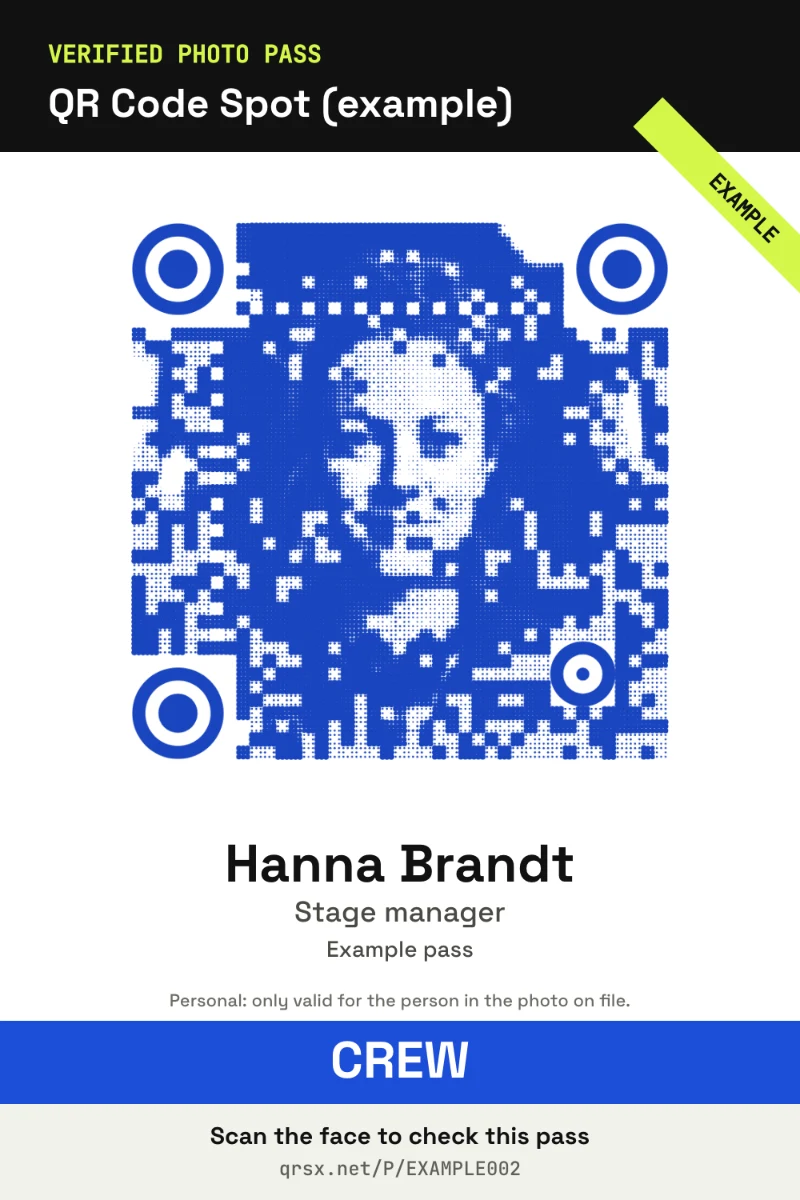
The face code comes in the photo's own colours by default. Under Organisation you can switch it to halftone print: the face drawn in one ink, with dots sized by its shading, like a newspaper photo. Use each pass type's colour, so a crew pass is blue and an artist's pass orange and a guard can tell them apart at a glance, or pick one ink for every pass.
Halftone faces print cleanly on one-colour cards and lanyards, and they come from the same engine as Photo QR, which we wrote about in why most art QR codes fail in print. Light colours are darkened so the code still scans, a face that's too dark for one ink keeps full colour, and every card still has to pass the same 8 scan tests.
What we keep, and what we don't
A pass that shows a photo when it's scanned has to be careful with that photo:
- We keep a small photo of the holder's face, shown only on that pass's check page, and delete it as soon as the pass is revoked or expires.
- ID and phone numbers are cut to the last 4 characters before they're stored: enough to compare with an ID card, without putting the whole number on show to anyone who scans.
- There's no face recognition. The photo is there for a person to compare with the face in front of them, and face framing runs in your browser.
- A Verified Photo Pass is not a government ID, and the check page never pretends it is.
Running it for a whole event
Your passes live in a private dashboard at qrcodespot.com/passes, with tabs for passes, issuing, access, gates, analytics, team and organisation. You can add your event's logo and artwork to every card, live pass, check page and gate. Analytics follow every pass from invite to exit, with an hourly chart, refusals and a CSV log. Up to 3 helpers can issue passes, approve selfies or run gates with only the permissions you tick, and guards need no account at all.
Verified Photo Pass is a beta in QR Labs, on paid plans, and every paid plan includes “✓ Verified issuer”. Each active pass uses one of your plan's editable QR codes (50 on Starter, 300 on Growth, 1,000 on Pro, 3,000 on Scale), and revoked or expired passes free theirs again. Each event keeps its own passes, gates and analytics. Events per plan: 2 on Starter, 5 on Growth, 20 on Pro, 100 on Scale.
Giving out tickets to guests as well? SealTicket runs on the same engine, and an event can have both: passes for your staff and tickets for your guests, checked by the same scanner.
The passes on this page are examples from the Photo Pass page. The faces are AI-generated and the names are made up; they aren't real people. Their codes passed all 8 scan tests and open example check pages; scan one to see its check page.
More from the blog
See a pass for yourself
Scan an example pass with your phone and open its check page, then issue your own on a paid plan.