Your own domain in your QR codes: what it changes, and what it doesn't
On Pro and Scale, your editable codes can carry your own address, like go.yourbusiness.com/K7M2XQ, instead of qrsx.net/K7M2XQ. This post explains what that changes for the people who scan them, how it works behind the scenes, and the trade-offs worth knowing before you print.
1. The address people see before they tap
Point a phone camera at a QR code and most phones show the address before opening anything. That small preview is where people decide whether to trust the code. They've been taught to look at it, too: fake codes stuck over real ones on parking meters and posters, sometimes called quishing, are now a regular warning from banks and police.
With a short link service's domain, the preview shows a name the person may not know. With your own domain, it shows a name they already associate with you. We don't have a study that measures how many more people tap the second kind, and we'd be careful with anyone who quotes a precise number. The reasoning is simpler: a familiar name answers the question people are asking at that moment.
It matters most when the code is the first thing someone sees from you:
- Packaging and labels, where the code sits next to your brand for years.
- Agencies, who make codes for clients and want the client's name in the link, not the agency's or ours.
- Hotels, restaurant groups and chains, where guests scan codes in many places and should see one name everywhere.
- Events and public posters, where people are most likely to wonder whether a code was stuck on by someone else.
2. What happens when someone scans
You point a subdomain you own, like go.yourbusiness.com, at us with one DNS record. From then on, a scan of go.yourbusiness.com/K7M2XQ comes to QR Code Spot, which checks that the code belongs to your account and forwards the person to wherever you've sent it, exactly like a qrsx.net link.
go.yourbusiness.com/K7M2XQYour pageqrsx.net/K7M2XQ (the same code)Your pagego.yourbusiness.com/ another account's codeNot foundEvery code opens on your domain and on qrsx.net. Codes from other accounts never open on yours.
A few details that matter more than they look:
- Only your codes open on your domain. Someone who types another account's code after your domain gets a not-found page. Your domain can't be used to forward people to links you didn't make.
- The padlock (https) is set up for you once the record is found. You don't buy or install a certificate.
- Your name, not ours. Pages people might see on your domain, like “this code doesn't exist”, carry no QR Code Spot name or links. The bare address, go.yourbusiness.com with nothing after it, can forward to your website. If you don't set that, it shows a plain page saying the address is for QR code links, with a small link to report a code and a “Powered by” line.
- Search engines are asked to stay out (robots.txt), so your short links don't show up in search results next to your website.
- Your website and email don't change. The record covers only the subdomain you chose.
3. A subdomain or a whole domain?
go.yourbusiness.com/K7M2XQ
- One CNAME record, at any DNS host
- Your website and email stay as they are
- Usually live within minutes
yourbusiness.link/K7M2XQ
- A second domain kept just for QR links
- Needs its DNS on Cloudflare (the free plan is enough)
- Any website on it stops; its email keeps working
A whole domain makes the shortest links, but it has to be one you keep only for QR codes: once it points to us, whatever website it had stops. That's why we ask you to tick a box confirming it before we add one, and why www addresses aren't accepted (they're nearly always a website). A whole domain also needs Cloudflare's DNS, because only there can a bare domain point to us in a way that lets the padlock be set up. ANAME and ALIAS records at other DNS hosts don't work for this. The step-by-step guide walks through the move, which takes about an hour, mostly waiting.
Keep it short either way. The address is part of what the code stores, and a longer address means more squares. Your link goes into the code in capitals, as qrsx.net links do: QR codes store capitals and digits in a compact mode, and the web address opens the same page either way. So go.yourbusiness.com/K7M2XQ fits the same plain 25×25 code as qrsx.net/K7M2XQ, and so does any domain of up to about 23 characters. A long subdomain on a long domain needs 29×29 or more, and smaller squares are harder to scan from a distance, so choose go. or qr. rather than a whole word, and print a little larger if your domain is long. We explain why fewer squares scan better in what's inside our QR code engine.
4. Setting it up
You add the address under White label in your account, then add one record where you manage the domain. The rest happens by itself:
- AddedYou type go.yourbusiness.com
- Waiting for DNSYou add one CNAME record
- Setting up the padlockAutomatic, usually minutes
- LiveWe email you; new codes use it
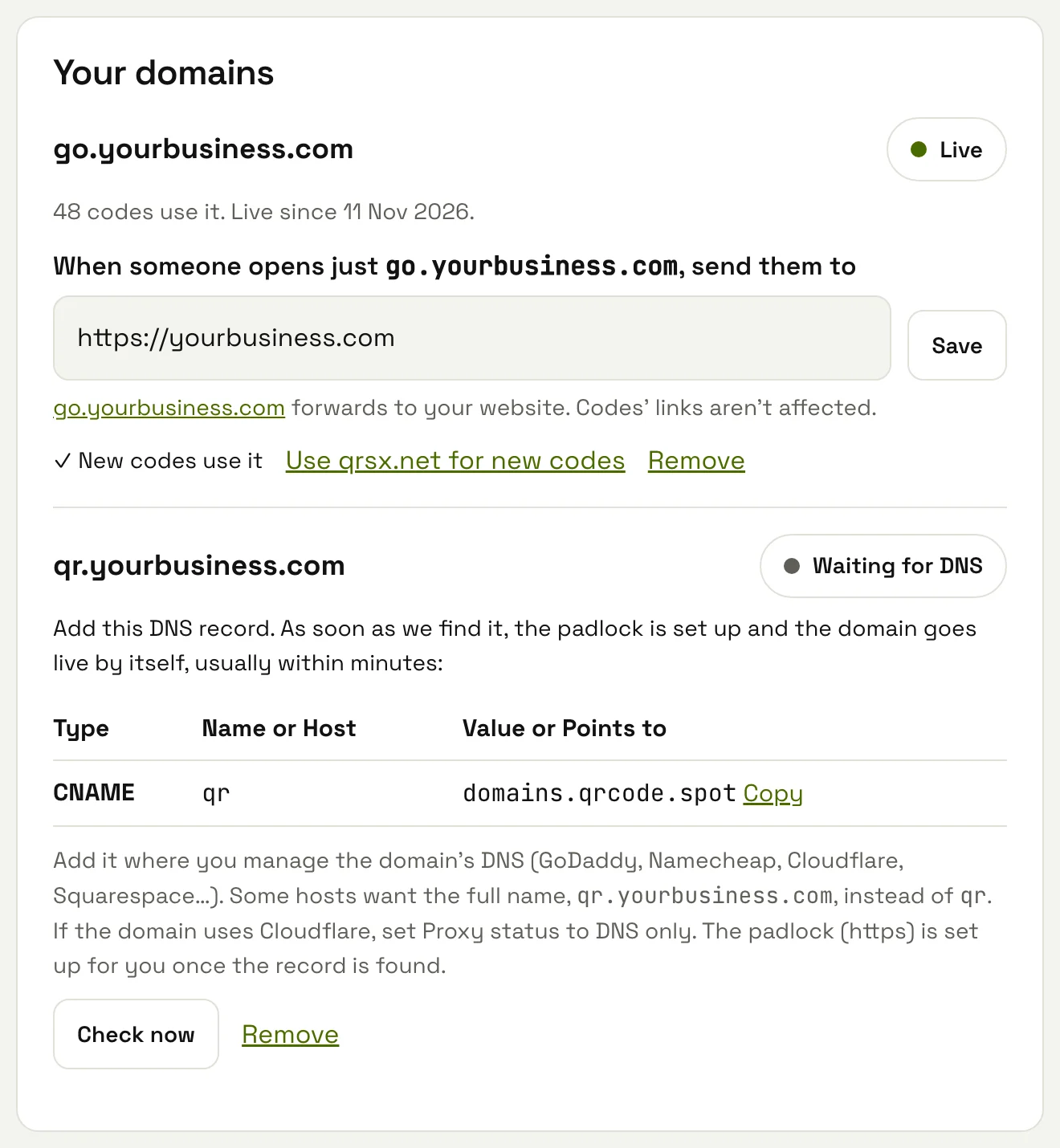
We look for the record by itself, often at first and then less often, so you don't need to come back. Check now looks straight away and tells you what it found, such as a record pointing somewhere else. DNS changes usually show within minutes and sometimes take up to a day.
A few addresses wait for a person to look at them first, usually within a day: ones that contain words like bank, login, verify or the name of a well-known brand. Adding a DNS record proves someone controls a domain, not that the name is honest, so an address with “bank-login” in it shouldn't go live automatically, even for a paying account.
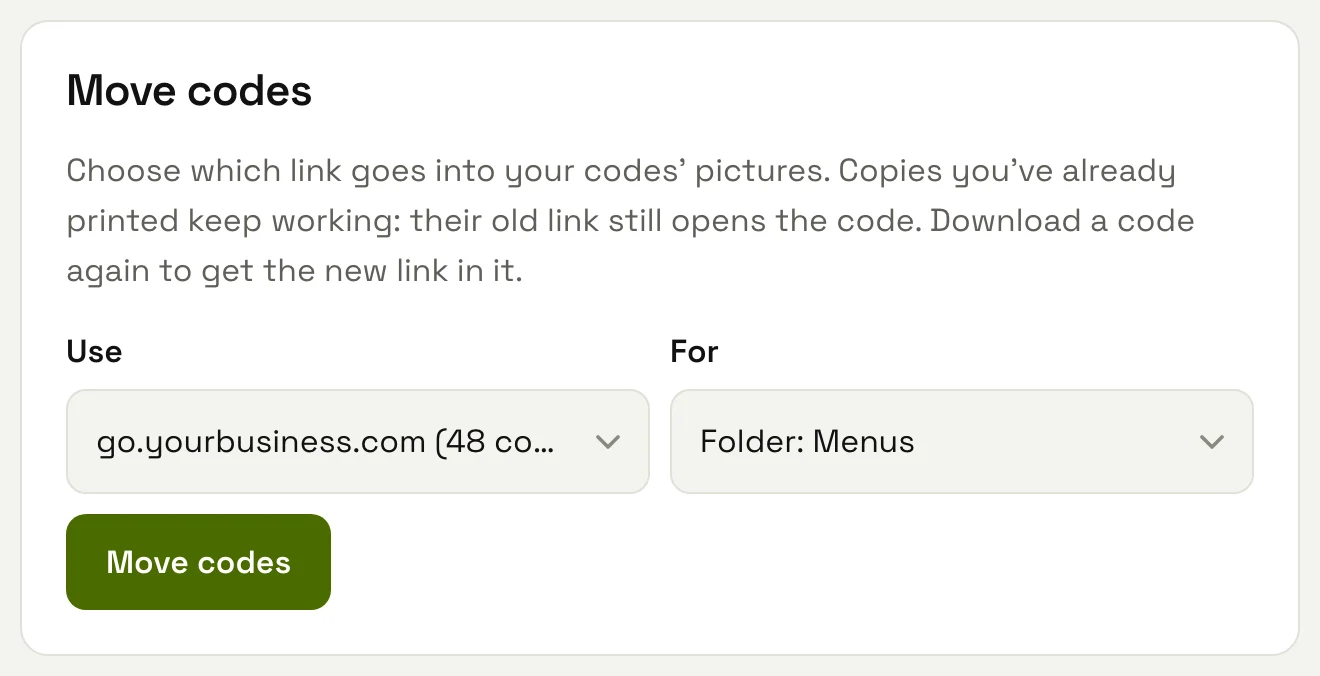
Once the domain is live, new codes use it. Move codes switches the ones you already have, all of them or one folder's, and you download them again to get the new link in the picture. Codes you've already printed with qrsx.net keep working: moving a code only changes which link goes into new downloads.
5. What we promise
- Every code also opens on qrsx.net. Moving codes between domains, or back to qrsx.net, never breaks a copy you've already printed.
- A live domain keeps working on every plan, Free included, and so do the codes printed with it. Your plan decides how many domains you can add (3 on Pro, 20 on Scale) and use for new codes, not whether existing ones keep opening.
- The domain stays yours. Download all my codes gives every code's link and destination. If you ever leave, you can point the subdomain at another service and set up the same links there, so codes printed with your domain can follow you. Codes printed with qrsx.net can't, which is one more reason to use your own domain for anything printed in large numbers.
- Editable codes are never paused or put behind a paywall, whatever the domain. That's in our guarantee.
6. The trade-offs
Your own domain moves some responsibility to you. It's worth knowing before you print:
- Your domain, your renewal. A printed code holds the address in its picture. If the domain expires, or the DNS record is deleted, codes printed with it stop opening at that address, even though the same codes still work on qrsx.net. Turn on auto-renew where you bought the domain, and tell whoever manages your DNS what the record is for.
- Removing the domain from your account has the same effect on copies printed with it, so we ask you to confirm first.
- Print only once it shows Live. A code printed while the domain is still waiting for DNS won't open until it's set up.
- A long address makes a denser code. Up to about 23 characters it's the same size as a qrsx.net code; beyond that it needs more, smaller squares, as explained above.
- You may not need it at all. If a code only has to open your website and never change, a static code already shows your own address, because it holds yourbusiness.com directly. It's free, needs no account and has no short link in between. Short links, on any domain, are for codes you want to change after printing or count scans on.
7. Questions to ask any provider
Many QR code services offer a custom domain feature in some form. Whichever you choose, these are the questions we'd ask:
- Is https included, and on which plan?
- What happens to codes on my domain if I move to a cheaper plan or stop paying?
- Can other customers' links open on my domain?
- Do the pages people see on my domain carry your name?
- Can I export my links and destinations if I leave?
Our answers are above. For the setup itself, follow how to set up your own short link domain.
More from the blog
Put your name in your codes
White label comes with Pro and Scale, with https included.